

Beas Manufacturing for SAP Business One
SAP Business One gives you bills of materials and production orders. Beas adds what a running plant needs on top: scheduling against resource limits, factory data capture at the terminal, quality control with inspection plans, overheads through calculation schemas, and post-calculation of actual against planned cost per work order. It runs inside SAP B1 and posts to B1 accounts, including WIP, so the plant and finance work from the same numbers.
- Works with your current SAP B1 partner
- Beas Basic plus the licensed modules your plant needs
One work order, four questions answered
- 01Can we make it by the date?APS and MRP2 show machine load against capacity before you commit (APS licence).
- 02What is happening on the floor?Operators report start, interruption, completion, finished goods and scrap at the terminal.
- 03Is it right first time?QC-inspection plans on items and routing operations create QC orders.
- 04What did it really cost?Post-calculation: accrued against planned cost, per work order.
Six B1 modules, extended by Beas
-
B1 Module 10
Beas Extension for SAP B1 Resources
- SAP B1 on its own
- Machines and labour as resources, with daily capacity and a standard cost.
- Beas adds
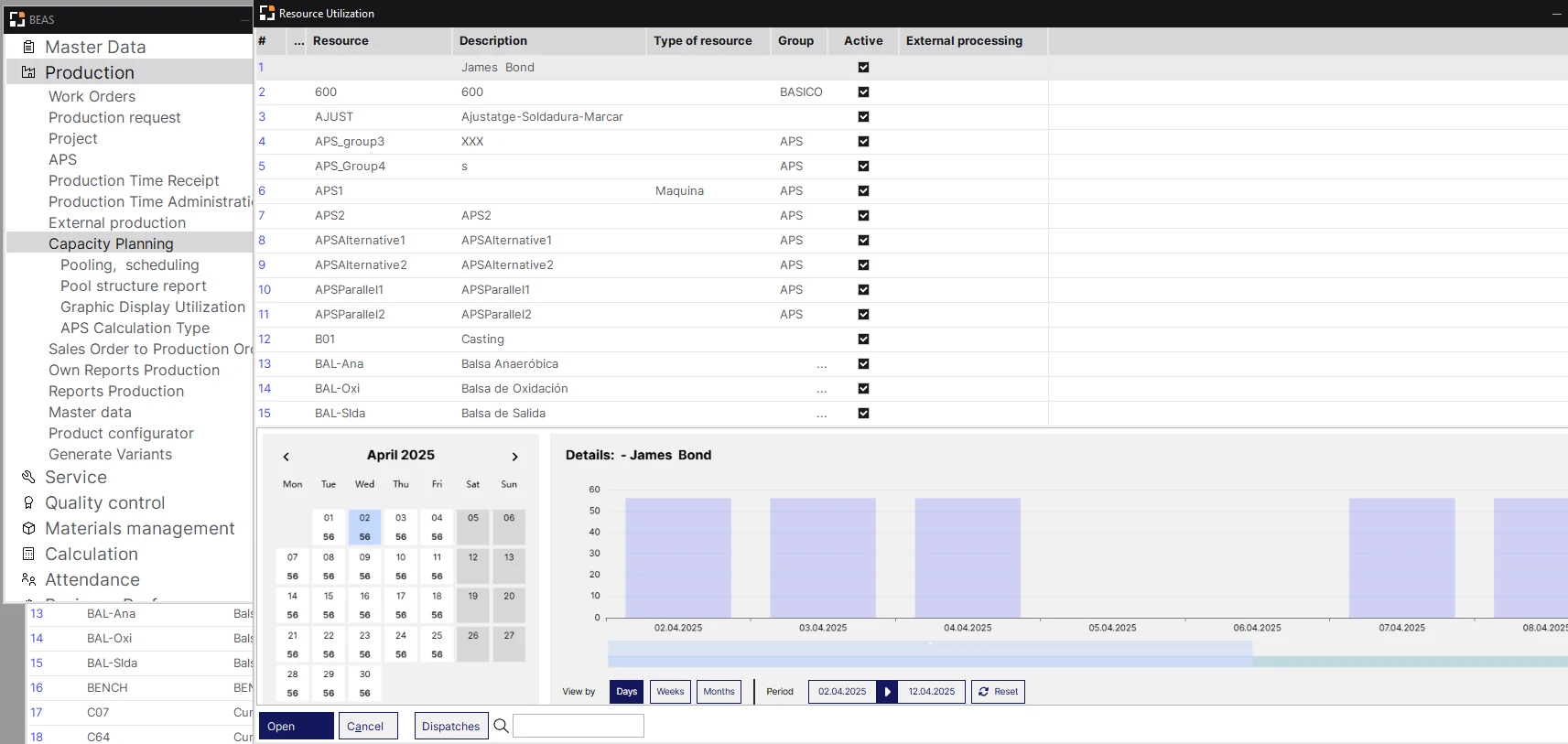
- “Consider resource limits” per resource and automatic optimisation to a faster alternative resource (both APS licence), resource calendar exceptions, and maintenance plans (Maintenance licence).
-
B1 Module 11
Beas Extension for SAP B1 Production
- SAP B1 on its own
- Bills of materials and production orders with the statuses Planned, Released, Closed and Canceled.
- Beas adds
- Routings, factory data capture, the Production Cockpit, QC-inspection plans, item versions and post-calculation per work order.
-
B1 Module 12
Beas Extension for SAP B1 MRP
- SAP B1 on its own
- The MRP Wizard reads orders, forecasts and stock, and recommends what to buy and make.
- Beas adds
- MRP Wizard with scenarios and purchase and production recommendations, and MRP2 for resource load against capacity.
-
B1 Module 9
Beas Extension for SAP B1 Inventory
- SAP B1 on its own
- Batch and serial numbers, with the Forward and Reverse Batches and Serials Trace Report.
- Beas adds
- Item versions carried on batch and serial goods receipts, and picking for production through the Produmex WMS integration.
-
B1 Module 2
Beas Extension for SAP B1 Financials
- SAP B1 on its own
- Cost accounting with cost centres and distribution rules.
- Beas adds
- Marginal and full cost rates, calculation schemas for material and production overheads, WIP account postings, and post-calculation per work order.
-
B1 Module 16
Beas Extension for SAP B1 Reports
- SAP B1 on its own
- Inventory audit reports, SAP Crystal Reports, scheduled report mailing and the query generator.
- Beas adds
- The Production Cockpit for live work order and resource status, and the AI Assistant for data retrieval (Beas 2025.09+).
Nine industries, one production platform
-
Engineered 01
Industrial Machinery & Plant Engineering
Covers: Industrial Machinery · Plant Construction
Top challenges
- Fast, accurate quotes for machine variants
- Engineering changes arriving mid-order
- Project margin across several live projects
- Product Configurator
- Precalculation
- Item versions
- Project management
-
Engineered 02
Metal Fabrication & Job Work
Covers: Metal Fabrication
Top challenges
- Quoted against actual cost on every job
- Coating and machining at outside vendors
- Paper job cards hiding job status
- Pre/post-calculation
- External production
- Factory data capture
- APS
-
Engineered 03
Aerospace & Defence
Covers: Aerospace and Defence
Top challenges
- Every part traceable to its origin
- BoM revisions reaching every department
- Special processes at outside vendors
- Item versions
- Quality control
- External production
- Routing
-
Component 04
Automotive Components
Covers: Automotive
Top challenges
- Traceability the OEM demands
- Dates promised against real machine, tool and labour limits
- Shop-floor status still on paper
- APS
- Factory data capture
- Tool Administration
- Post-calculation
-
Component 05
Electronics & High Tech
Covers: High Tech and Electronics
Top challenges
- BoMs entered twice, in PLM and in ERP
- Costing a new item takes too long
- Constant BoM changes under cost pressure
- Data Integration Hub
- Precalculation
- Item versions
- APS
-
Component 06
Plastics & Packaging
Covers: Plastics Processing · Packaging
Top challenges
- Machine capacity matched to material
- Mould and tool life running out
- Regrind and by-products hiding true part cost
- APS
- Tool Administration
- Post-calculation
- Produmex WMS
-
Process & Regulated 07
Chemicals & Personal Care
Covers: Chemicals · Personal Care
Top challenges
- Formula cost that changes with batch size
- Waste distorting unit cost
- Formula changes and cosmetics GMP
- Variant generator
- Calculation schema
- Item versions
- Quality control
-
Process & Regulated 08
Food & Beverages
Covers: Food and Beverages
Top challenges
- Shelf life driving every plan
- Waste lost in every batch
- Batch traceability for customers and auditors
- Quality control
- Produmex WMS
- Post-calculation
- MRP Wizard
-
Process & Regulated 09
Pharma, Life Sciences & Medical Devices
Covers: Life Sciences · Medical Devices
Top challenges
- GMP, ISO 13485 and UDI requirements
- Electronic records, audit trail and e-signature
- Batch and serial traceability against counterfeits
- QC with e-signature
- Quality control
- Item versions
- Produmex WMS
Engineered: Engineer- and make-to-order, project-based
Component: Repetitive discrete, tooling, lot and serial
Process & Regulated: Formula, batch and compliance-led
What Beas does on the floor, and what it returns
Planning & Scheduling
Operational Reality (Capabilities)
APS schedules work orders against each resource's planned capacity, shift schedule and factory calendar, backwards from the delivery date or forwards from the start date. With “Consider resource limits” switched on, a resource is not loaded beyond its capacity.
- Backward and forward scheduling
- “Consider resource limits” per resource
- Gantt chart in APS
Executive ROI Value
Delivery dates come from actual machine load. Overloads show up before work orders are released, while there is still time to re-sequence.
- Fewer missed delivery dates
- Overtime planned in advance
Operational Reality (Capabilities)
The MRP Wizard calculates material requirements from sales orders, forecasts, minimum stock and current stock (blocked stock excluded) and creates purchase and production recommendations. MRP2 shows resource workload against capacity per scenario.
- MRP scenarios
- Purchase and production recommendations
- MRP2 load against capacity, overload flagged
Executive ROI Value
Buyers order what open demand needs, and planners see which resources are overloaded before committing to new orders.
- Less slow-moving stock
- Fewer shortages at the line
Operational Reality (Capabilities)
During the APS calculation, Beas checks whether an alternative resource defined on the routing operation would give faster production and replaces the resource automatically. Planners can also switch alternative resources manually in APS or on the work order.
Executive ROI Value
Work moves to the machine that finishes it sooner, so idle capacity is used without a planner re-keying every operation.
- Better use of existing machines
- Shorter lead times on overloaded resources
Operational Reality (Capabilities)
The resource calendar holds period exceptions that overwrite planned capacity, each with a reason. The Maintenance of Resources and Components module adds preventive and predictive maintenance plans and creates interruptions that APS considers when scheduling.
- Dated capacity exceptions with a reason
- Preventive and predictive maintenance plans
- Shifts cannot run over midnight
Executive ROI Value
No work order is promised on a machine that will be under maintenance, and maintenance is planned rather than squeezed in.
- Fewer unplanned stoppages
- Realistic capacity in every schedule
Operational Reality (Capabilities)
Right-click a sales order or quotation line to estimate a possible delivery date by forward resource scheduling, checking resource and material availability for the assembly and its order-related sub-structure. CTP uses APS; ATP is for companies without an APS licence.
- From the sales order or quotation line
- Checks resources and material
- Based on the last MRP run
Executive ROI Value
Sales quotes a delivery date the plant can meet, at the time of the enquiry.
- Fewer broken delivery promises
- Faster replies to customers
Engineering & Product Data
Operational Reality (Capabilities)
The routing manages the sequence of operations on internal work centres or external providers, using the routing catalogue, operation catalogue, production routing, alternative and parallel operations, and tools.
- Routing and operation catalogues
- Alternative and parallel operations
- Internal and external operations
Executive ROI Value
Every work order starts from the same controlled sequence and times, so schedules and costs rest on one set of master data.
- Consistent schedules and costs
- Faster set-up of new items
Operational Reality (Capabilities)
Items can be version-managed, and bills of materials support item versions. The item version status manages release: it defines whether the bill of materials, routings and work orders can be changed, and controls locking, sales and purchase documents, reservations, material planning and work orders. Version numbers are carried on goods receipts for batch and serial items.
- Bills of materials per item version
- Release and locking through item version status
- Carried on batch and serial goods receipts
Executive ROI Value
Engineering changes go into a new version with its own release status, so only released versions reach purchasing, planning and the shop floor.
- Fewer orders made to an outdated design
- Version visible at goods receipt
Operational Reality (Capabilities)
Beas produces product variants using short variants A–Z, item versions, or the variant generator, which evaluates formulas, tables, variables or Beas Script behind BoM and routing fields when work orders or calculations are created.
- Short variants A–Z
- Item version method
- Variant generator with formulas and tables
Executive ROI Value
Variant-rich products are made from one controlled structure instead of hundreds of near-duplicate items.
- Smaller item master
- Fewer errors on special orders
Operational Reality (Capabilities)
Configures products from a quotation or sales order (right-click “Configuration: New”), generating item, BoM and routing variants, price calculation, precalculation and multilevel work orders. Integrated and WEB variants exist.
- Started from quotation or sales order
- Generates item, BoM and routing variants
- Price calculation and precalculation
Executive ROI Value
Engineer-to-order quotations are produced faster and carry straight through to work orders.
- Faster, more consistent quotations
- No re-keying from quote to work order
Orders & Projects
Operational Reality (Capabilities)
Creates new work orders from customer orders or pre-invoices in one window, with “Order related” and “Storage related” tabs listing order-related assemblies against their work orders.
- From sales orders or pre-invoices
- Order-related and storage-related tabs
- Assemblies listed against work orders
Executive ROI Value
Customer orders reach the plant as work orders without manual re-entry.
- Less data-entry labour
- Order and work order stay linked
Operational Reality (Capabilities)
Schedules and monitors orders with tasks, budgets, activities, purchase, sales and service per project. Adding a project creates a work order; milestones mark checkpoints in routings with plan and milestone dates.
- Tasks, budgets and activities
- Work order created with the project
- Milestones in routings
Executive ROI Value
Project-based manufacturers see budget, progress and milestones per project in one place.
- Earlier warning on project overruns
- Milestones visible to sales and production
Operational Reality (Capabilities)
Outsources operations to a supplier as a service item on a purchase order, optionally with provision of parts. Supports collective purchase orders, goods receipt, and posting of provided parts against the work order.
- Service item on a purchase order
- Provision of parts to the supplier
- Provided parts posted against the work order
Executive ROI Value
Material sent to job-workers stays accounted for against the work order, and outside processing appears in the order's cost.
- Less unaccounted material at vendors
- Outside operations in the work order cost
Shop Floor
Operational Reality (Capabilities)
Employees log on with a personnel card number and report work order times, statuses and quantities on PC terminals or browser-based WebApps on touch screens, tablets and handheld devices.
- Beas Desktop Terminal and Beas WebApps
- Log-on by personnel card number
- Times, statuses and quantities
Executive ROI Value
Costing and planning run on reported times instead of estimates, and paper job cards go away.
- Less re-keying at shift end
- Actual times for costing
Operational Reality (Capabilities)
Shows the current status of all work orders (new, delayed, to start, finished today, material shortage), real-time progress by operation, and resource status and utilisation.
- Work order status lists
- Real-time progress by operation
- Resource status and utilisation
Executive ROI Value
Supervisors and plant heads see delays and material shortages during the shift, not at the end of it.
- Faster response to delays
- Fewer status calls and meetings
Operational Reality (Capabilities)
Maintains tools and utilities, records costs, stores drawings and documents, and enters tool requirements through the routing. Tool types range from utility to tool with resource planning that is reserved.
- Tool master with costs and documents
- Tool requirements on the routing
- Reserved tools with resource planning
Tool costs are not included in post-calculation.
Executive ROI Value
Tools needed for an operation are known in advance, and tool documents are kept in one place.
- Fewer jobs waiting for tooling
- Tool documents found quickly
Operational Reality (Capabilities)
Manages personnel, shift models, attendance and absence, and runs monthly time evaluation to calculate vacation and flextime accounts. Time is recorded through the Desktop Terminal App or the web “Terminal” and “Time Recording” apps.
- Shift models
- Attendance and absence
- Monthly time evaluation
Executive ROI Value
Attendance and production time come from the same terminals, so payroll inputs and labour costing agree.
- Less manual attendance work
- Labour hours that match production
Quality
Operational Reality (Capabilities)
QC-inspection plans on items and routing operations create QC orders. Goods post to a QC warehouse and are released or blocked by transfer, and batch status controls release. Four-eyes principle and electronic signature are supported.
- QC-inspection plans on items and operations
- QC warehouse, release or block
- Four-eyes principle and e-signature
Executive ROI Value
Defects are stopped at the stage they appear, and release decisions are recorded for customer and certification audits.
- Less rework and fewer rejections
- Audit records from the system
Costing
Operational Reality (Capabilities)
Creates cost estimates from Sales – A/R, linked by reference number to quotations and sales orders, using a calculation schema, with variant and configuration ID, change tracking and lot-size views.
- Linked to quotations and sales orders
- Calculation schema
- Lot-size views
Executive ROI Value
Quotations are priced from a costed structure, so margins are known before the order is accepted.
- Fewer under-priced orders
- Faster costing of new items
Operational Reality (Capabilities)
Resources carry marginal and full cost rates. Calculation schemas add material overhead (by material group) and production overhead in per cent, and define which WIP accounts are posted. Time receipts and surcharges post to WIP, cleared on assembly receipt.
- Marginal and full cost rates per resource
- Material and production overhead %
- WIP account postings
Executive ROI Value
Overheads reach product cost by rule, and WIP sits in the ledger under accounts finance controls.
- Product cost that includes overheads
- Cleaner WIP at month-end
Operational Reality (Capabilities)
Part of the Business Performance module. Time receipts post labour and machine costs to direct cost centres; indirect cost centres and cost pools, such as maintenance, supervision and quality control, are distributed to them by distribution keys and carried into products. Goods are revalued, open values of unfinished production orders are handled at month-end, sub-assembly costs are redirected to the products that consumed them, and recommended cost rates are produced for resources.
- Direct and indirect cost centres, cost pools and distribution keys
- Revaluation of goods and month-end handling of unfinished orders
- Recommended cost rates for production resources
Executive ROI Value
Product cost carries the plant’s real labour and overheads, and cost rates for next period come from actual figures instead of last year’s estimates.
- Overheads reach product cost by distribution keys
- Better basis for pricing decisions
Operational Reality (Capabilities)
Post-calculation per work order calculates accrued and planned costs, marginal and full costs, with a plan/target comparison. Batch post-calculation calculates several work orders at once.
- Accrued against planned cost
- Marginal and full cost
- Batch post-calculation across work orders
Executive ROI Value
Margin leakage is traced to the work order and cost element that caused it.
- Loss-making orders found early
- Pricing based on proven cost
Integration & Configuration
Operational Reality (Capabilities)
Beas sends material requests to Produmex WMS for picking with the Mobile Client, and WMS confirms picks for reservation. Production goods issue and receipt, SSCC and QC transfer are supported.
- Picking for production
- Production issue and receipt
- SSCC and QC transfer
Executive ROI Value
Stores knows what production needs next, and the line does not wait for material.
- Less waiting at job start
- Material movements recorded as they happen
Operational Reality (Capabilities)
Changes Beas window behaviour: adds function buttons and right-click entries, adds or changes fields, sets fields mandatory, hidden or read-only through the Item Placement Tool, and defines data validations.
- Function buttons and right-click entries
- Item Placement Tool
- Data validations
Executive ROI Value
Process changes are made as configuration, so they are easier to maintain through upgrades than custom code.
- Lower cost of process changes
- Screens fitted to each team
Operational Reality (Capabilities)
Imports items, BoMs, routings, master data and transaction data (working hours, attendance, receipts, issues) from XML, Excel, text/CSV or ODBC sources, manually or scheduled, including CAD BoM import and PDM synchronisation.
- XML, Excel, CSV and ODBC sources
- Manual or scheduled imports
- CAD BoM import and PDM synchronisation
Executive ROI Value
Engineering data is entered once, not typed again from CAD or spreadsheets.
- Less double entry
- Faster release of new BoMs
Operational Reality (Capabilities)
Defines events in SAP or Beas that trigger a B1 message, B1 activity, Beas activity or user-defined action, with up to three decision options. Events can block operations and chain actions into workflows.
- Triggers B1 messages and activities
- Up to three decision options
- Can block operations
Not a replacement for SAP B1 draft approval.
Executive ROI Value
The right person is told when something needs a decision, without someone watching every screen.
- Faster responses to exceptions
- Rules applied consistently
Operational Reality (Capabilities)
A ChatGPT-based chat opened from the Production Cockpit that creates work orders, time receipts and goods receipts and issues, and retrieves data from Beas work orders or any SAP B1 table as tables or SQL.
- Opened from the Production Cockpit
- Creates work orders and receipts
- Retrieves Beas and SAP B1 data
Data retrieval and document creation do not cover all fields.
Executive ROI Value
Routine postings and look-ups take a sentence instead of several screens.
- Quicker routine postings
- Answers without writing queries
Every Beas feature, explained in depth
-
01
Guides available
Production Planning (APS)
-
02
MRP Wizard and MRP2
-
03
Automatic Optimisation
-
04
Resource Calendar and Maintenance
-
05
Capable-to-Promise and Available-to-Promise
-
06
Routing
-
07
Item Version Control
-
08
Variant Production
-
09
Product Configurator
-
10
Sales Order to Production Order
-
11
Project Management
-
12
External Production
-
13
Factory Data Capture
-
14
Production Cockpit
-
15
Tool Administration
-
16
Human Resources and Time Recording
-
17
Quality Control
-
18
Precalculation
-
19
Calculation Schema and Cost Rates
-
20
Absorption Costing
-
21
Post-Calculation
-
22
Produmex WMS Integration
-
23
Beas Usability Extension (B1UP)
-
24
Data Integration Hub
-
25
Event Control
-
26
Beas AI Assistant
Production data that stays inside your SAP B1
SAP Certified
Beas is a Boyum IT product, SAP certified for SAP Business One.
Upgrade-Safe
Production add-ons built locally for one customer often break after an SAP Business One upgrade. Boyum IT releases Beas versions for new B1 releases, so your plant keeps running when B1 moves forward.
Posts to B1 accounts
Time receipts and surcharges post to the WIP accounts defined in the calculation schema, and are cleared when the assembly is received. Finance reads production cost in the SAP B1 ledger, not in a separate system.
Configured, not coded
Beas window behaviour can be changed with the Beas usability extension in B1UP (separate B1UP licence), and events can trigger B1 messages and activities through Event Control, so many process changes are configuration rather than custom code.
- Exclusive Boyum Practice, India's first since 2021
- Boyum APJ Partner Excellence Award 2024
From spreadsheet planning to Beas on your floor
-
01
Gap Review on Your Plant
We walk your floor and your SAP B1 together and find where planning, job cards and costing still live in spreadsheets or on paper. Each gap is matched to a Beas module.
-
02
Beas Deployment on a Test Copy
Beas is configured on a test copy of your B1 company with your own items, routings and resources, and signed off before it touches live data. We coordinate timing with your SAP B1 partner.
-
03
Go-Live and Ongoing Support
BPAS Exclusive Enhancement · maxValue Annual maintenance for your Boyum products, kept current through every SAP Business One upgrade. →Planners and operators are trained on their own work orders. After go-live, Beas stays supported and current through SAP Business One upgrades.
An operator in uniform scanning a work order barcode at a touch-screen terminal mounted beside a CNC machine. Screen at an angle, machine and parts behind. A customer plant with written permission, or a staged shot.
1200 × 900 px · WebP · beas-terminal-operator.webp
A BPAS consultant with a client's plant head and planner, walking the floor or reviewing the APS schedule on a laptop in the plant office. BPAS ID card or T-shirt visible; real team members, not stock models.
1200 × 900 px · WebP · bpas-gap-review-plant.webp
See your own product running in Beas
Bring one product, its routing and a recent production order. We map it into Beas and show you the schedule, the terminal booking and the work order post-calculation side by side, before you commit to anything.