

Production Planning in Beas: Capacity Planning and APS
Delivery dates your machines can actually meet.
SAP Business One records your resources and their daily capacity, and allocates capacity to production orders by date. Beas APS goes further: it dispatches every work order operation to a resource, inside its shift schedule and against the time already reserved, so overloads show before work starts and sales gets a date the floor can keep.
- Finite capacity planning inside SAP B1 (APS licence)
- Overloads seen in red before work starts
At a glance
- Beas name
- Capacity Planning, APS
- Extends SAP B1
- Resources · Production
- Plans against
- Resources and resource groups, each with planned capacity and a shift schedule
- Works with
- MRP Wizard and MRP2 · Factory data capture
- Licence
- Beas APS (BEAS_APS) for resource limits, calculation types and optimisation; Beas APS Gantt Viewer for the Gantt chart
From customer order to a dispatched operation
-
Demand arrives
The MRP Wizard turns sales orders, forecasts and stock into purchase and production recommendations. -
Work orders carry the routing
Each work order operation has its resource, Setup time and Mach+Labor Time/unit from the routing position. -
APS calculates
A calculation type dispatches operations backwards from the delivery date or forwards from the start date, within resource limits. -
Planner reviews
The Gantt chart and Graphic Utilization Display show overloads; the planner moves operations or switches to an alternative resource, then recalculates. -
The floor reports
Operators report at Beas terminals; started work orders are fixed in the next Dispatch forward.
What standard B1 allocates, and what Beas APS dispatches
| Planning need | SAP B1 native | Beas Capacity Planning, APS |
|---|---|---|
| Scheduling basis | Production order Start Date and Due Date; the Due Date is calculated from the Start Date and the parent item's lead time and can be changed manually. Route stages carry dates, and Recalculate Route Stage Dates updates the stages that follow. | APS calculation types dispatch each work order operation to a resource, using the Setup time and Mach+Labor Time/unit from the routing position. |
| Capacity | Internal, Committed, Consumed and Available capacity per resource and warehouse in the Resource Capacity window. An allocation method (On Start Date, On End Date, Start Date Forwards, End Date Backwards) spreads committed capacity over days. | Planned capacity (hrs/day) × Number of machines/persons × factory calendar percentage. With Consider resource limits on (APS licence), the resource is not dispatched above 100%. |
| Calendars and shifts | Daily internal capacity set per weekday on the Planning Data tab or in Set Daily Internal Capacities, with an option not to update holiday days. | Shift schedule per resource or resource group, factory calendar, and resource calendar exceptions for a period with a reason. Shifts cannot run over midnight. |
| Planning view | Capacity Data tab of the resource and the Resource Capacity window. | APS Gantt chart per work order or per resource (Beas APS Gantt Viewer licence), and the Graphic Utilization Display of capacity against workload. |
| Overloads | Committed against Available capacity is shown per day. | Overloaded days are shown in red in the Graphic Utilization Display; MRP2 flags a resource as Overloaded above 90% of its dispatching index. |
| Alternative machines | Resources are lines on the bill of materials and production order. | Alternative resources on the routing position, each with its own times. With Optimization enabled, APS can select the most adequate resource (APS licence). |
| Delivery promise | Due Date from the Start Date and the parent item's lead time. | Capable-to-Promise from the sales order or quotation line, by forward resource scheduling (APS licence). |
| Feedback from the floor | Issue for Production and Receipt from Production; resource capacity is consumed by backflush or manually. | Operators report start, interruption, completion, finished goods and scrap at Beas terminals (Terminal Production Data Collection licence). |
Eight things the planner controls, and what each saves
Operational Reality (Capabilities)
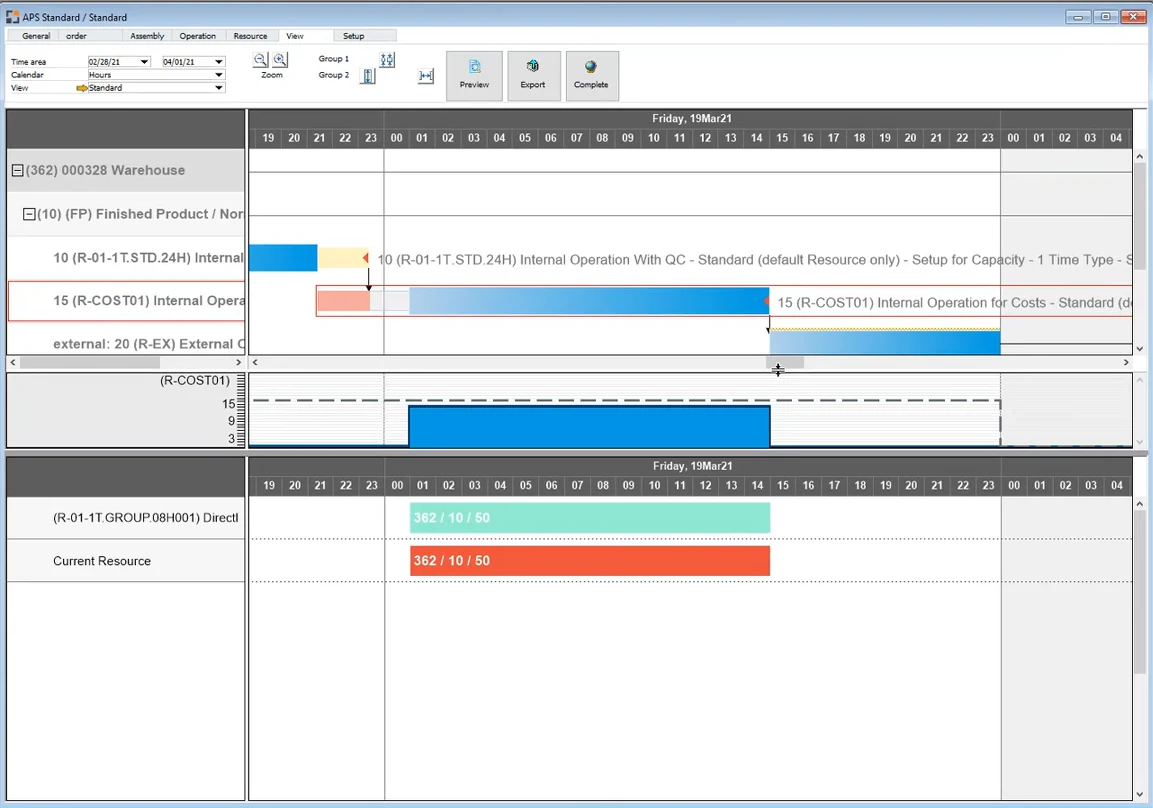
The APS Gantt chart shows the APS schedule per work order or per resource, with resource workload. It opens from Production › Capacity Planning › APS › View › Gantt, or by right-click › Graphical View in the production structure. Each resource's “View in APS” setting decides whether its operations appear.
- Per work order or per resource
- Resource workload on the same chart
- “View in APS” per resource (APS licence to change)
Executive ROI Value
Anyone can see what runs where, so planning survives leave, attrition and a second shift, instead of living in one person's spreadsheet.
- Planner hours go into decisions, not data entry
- Less dependence on a single “Excel expert”
Operational Reality (Capabilities)
Each resource has a “Consider resource limits” setting on its Scheduling tab. With the calculation's capacity-limit setting enabled, a resource with limits on is never dispatched above 100%, apart from exceptions such as manual APS fixes or priorities above 100%. When disabled, resource limits and other work orders' time reservations are ignored. Switch it off for external resources, except those with planned capacity.
- Per-resource setting
- Never dispatched above 100% when enabled
- Off for most external resources
Executive ROI Value
The schedule reflects the machines that really limit output. You stop promising capacity the plant does not have.
- Realistic plans on the machines that set throughput
- Fewer late orders from double-booked machines
Operational Reality (Capabilities)
Backward scheduling uses only the end date; forward scheduling uses only the start date. The default calculation types are Backward simulation (ignores time reservations and material availability), Backward Dispatch (latest possible date, with time reservations; for buying material as late as possible), Dispatch forward (resource-optimised; started work orders are fixed), forward Re-allocate, Catch Up, and forward with Material check (not before material is available).
- Backward Dispatch for late material purchase
- Dispatch forward for resource-oriented planning
- forward with Material check
Executive ROI Value
Backward scheduling keeps raw material and WIP off the floor until needed, which frees working capital. Forward scheduling answers “what is the earliest we can ship?” with a real date.
- Less material and WIP held early
- Confident answers on urgent enquiries
Operational Reality (Capabilities)
Each resource has a shift schedule; without one, the resource group's shift plan is used. Check calendar applies the factory calendar percentage. The resource calendar holds exceptions for a period: shift start and end, planned capacity and number of persons, with a reason. Planned capacity is net of cleaning, maintenance and other planned downtime, and shifts cannot run over midnight.
- Shift schedule per resource or resource group
- Resource calendar exceptions with a reason
- Factory calendar through Check calendar
Executive ROI Value
Adding a Sunday or third shift on one machine becomes a calendar change you can test before paying for it.
- Overtime and extra shifts justified by data
- No work dispatched to a resource with zero capacity
Operational Reality (Capabilities)
The Graphic Utilization Display shows planned times by day, week or month for each resource: a summary of all resource utilisation and a chart of capacity and workload in hours for the selected resource. Overloaded days show in red, and the Dispatches button lists the dispatches for the resource. MRP2 (Requirement of resources) shows workload against capacity per MRP scenario and flags a resource as Overloaded above 90% of its dispatching index.
- Capacity and workload per resource
- Overloaded days in red
- Dispatches list per resource
Executive ROI Value
Capital spending starts from evidence. Before buying another machine, you can see whether the problem is capacity, sequence or one large order.
- Better use of existing machines before new capex
- Early warning to sales on lead-time changes
Operational Reality (Capabilities)
Alternative resources are defined on the routing position, each with its own Setup time, Mach+Labor Time/unit and Use factor. With Optimization enabled, Beas selects the most adequate resource during the APS calculation; Allow manual selection controls manual switching. Identical machines can be one resource with a Number of machines/persons, or kept separate in a resource group.
- Own times per alternative resource
- Optimization during the APS calculation
- Number of machines/persons for identical machines
Executive ROI Value
Idle machines get used while orders queue at the favourite one, and load spreads across the plant.
- Higher use of installed machines
- Shorter queues at overloaded resources
Operational Reality (Capabilities)
Work sequences can be moved freely in the graphical view. The After Movement setting decides what happens: No action, Mark, Selecting and fixing, Select, fix at resource limits, or Fix, dispatch and bind. Moved operations are dispatched, but the following work sequences are not rescheduled; the planner runs Dispatch forward or another calculation type for that.
- Five After Movement options
- Moved operations marked with a red arrow
- Recalculate with a calculation type afterwards
Executive ROI Value
Planners keep control of exceptions without breaking the rest of the plan, and every manual change is visible.
- Fast response to urgent orders
- Manual fixes that are visible to everyone
Operational Reality (Capabilities)
Operators report start, interruption, completion, finished goods and scrap against work order operations at Beas terminals, logging on with a personnel card number. When APS runs Dispatch forward, work orders that are logged in (started) are fixed. Catch Up moves time reservations from the past into the future.
- Desktop Terminal or browser-based WebApps
- Started work orders fixed in Dispatch forward
- Catch Up for operations in the past
Executive ROI Value
The plan stays accurate because it starts from what the floor reported each shift, not from the morning's assumption.
- Plan adherence you can measure
- Fewer “hot” jobs jumping the queue
An Indian auto-components supplier, planned on a whiteboard
The Operational Challenge
The planner rebuilds an Excel plan every morning from B1 open orders and a whiteboard of machine status. B1 shows each production order's due date, but not that the three twin-pallet VMCs are booked solid for the next nine days.
Sales commits standard lead times regardless of load. When an OEM schedule is pulled in, the plant finds out at the machine.
- On-time delivery around 70% against OEM schedules
- Regular Sunday overtime to recover late orders
- Express freight to avoid line-stoppage debits from the OEM
- Twin-pallet VMCs overloaded while older VMCs sit idle
The Financial Transformation
With Beas APS, the VMCs have Consider resource limits switched on and the older machines are set up as alternative resources, with their own times, for simpler operations. The Graphic Utilization Display shows the overload nine days out, and the planner moves suitable work across.
Sales checks a Capable-to-Promise date from the sales order line before confirming. Sunday shifts are added as resource calendar exceptions only when the schedule shows which orders they recover.
- Delivery dates based on actual machine load
- Overtime planned in advance, for specific orders
- Fewer emergency dispatches by express freight
- Idle older machines take overflow work
A production planner in an Indian machining unit at a whiteboard covered with handwritten machine-wise job lists, printed Excel sheet in hand. Real plant, natural light, CNC machines visible behind.
1200 × 900 px · WebP · planning-whiteboard-before.webp
| Cost line | Before (per month) | After (per month) | Difference (per year) |
|---|---|---|---|
| Unplanned overtime | ₹ 3,50,000 | ₹ 1,40,000 | ₹ 25,20,000 |
| Express freight on late orders | ₹ 2,10,000 | ₹ 60,000 | ₹ 18,00,000 |
| OEM late-delivery debits | ₹ 1,20,000 | ₹ 30,000 | ₹ 10,80,000 |
| Total | ₹ 6,80,000 | ₹ 2,30,000 | ₹ 54,00,000 |
One plan, three answers
-
Promoter & CFO
Is capacity the real problem?
The Graphic Utilization Display and MRP2 show whether you need a new machine, a third shift or just a better sequence, before any capex is approved. -
COO & Plant Head
Will we ship on time this week?
The APS Gantt chart shows every work order's dispatched operations, so late orders are known days ahead, not on dispatch day. -
Production Planner
What runs where, next?
APS replaces the morning spreadsheet. Changes take minutes, and a recalculation reschedules the operations that follow.
Production Planning, explained in depth
-
10
10 Best Practices
Key settings for routings, calendars and resource limits, what goes wrong when they are skipped, and how to fix it.Read the 10 best practices for Beas production planning -
Aa
Vocabulary
Ten planning terms as Beas names them, from routing to the APS Gantt chart, each with an everyday analogy.Learn the 10 production scheduling terms planners use -
05
5 Core Concepts
The big ideas behind finite capacity planning in Beas APS, and the shop-floor problem each one solves.Understand the 5 core concepts of capacity planning
Related Beas features and B1 modules
- Beas 02 MRP Wizard and MRP2 Recommendations and resource load that feed the plan.
- Beas 03 Automatic Optimisation APS selects a more adequate alternative resource.
- Beas 04 Resource Calendar and Maintenance Capacity exceptions and maintenance plans.
- Beas 13 Factory Data Capture Terminal reports that keep the plan current.
- SAP B1 Module 10 Resources The machines and capacity Beas schedules against.
- SAP B1 Module 11 Production BoMs and production orders that Beas extends.
See next week's plan for your own machines
Share your machine list, shift pattern and a week of open orders. We load them into Beas and show you the APS Gantt chart, the overloaded resources and the dates your plant can really commit.