

Production Planning Vocabulary: 10 Terms in Beas Manufacturing
Speak the same language as your planner.
Most planning arguments between sales, production and finance are really arguments about words. "Capacity", "lead time" and "the machine is free" mean different things to each team. These ten terms are the names Beas itself uses for production planning, each defined the way Beas uses it, with an analogy from home.
Ten terms, in the order you meet them
-
01
Routing
Master data · routing and routing positions (operation catalogue, production routing)Routing positions carry the operation times
Operational definition
The sequence of operations to make a product, on internal work centres or external providers. Each routing position names the resource and carries its times: Setup time, Mach+Labor Time/unit, Quantity per Time and Idle Time, plus an Overlap Limit to the next operation.
Why it matters in Beas
Scheduling and costing both read the routing, so the schedule is only as accurate as this master data. A routing independent of the item master needs item version control.
Everyday analogy
A recipe's method: first chop the onions for 5 minutes, then fry on the big burner for 10, then simmer on the small one for 20. Same steps, same order, every time you cook the dish.
See it in action:Moving operations in the graphical view on the Production Planning page →
-
02
Resource
Master data · Edit resource › Scheduling tabGrouped in resource groups
Operational definition
A machine, work centre or group of people that performs operations. Each resource has Planned capacity (hrs/day), a Number of machines/persons, a shift schedule, a resource calendar and cost rates.
Why it matters in Beas
Total net capacity = planned capacity × number of machines/persons × the factory calendar percentage. Planned capacity is net of cleaning, maintenance and other planned downtime, and cannot exceed 24 hours a day.
Everyday analogy
The burners on your kitchen stove. Four burners means at most four pans cooking at once, however many dishes are ordered.
See it in action:Consider resource limits on the Production Planning page →
-
03
Work Order
Transaction · Beas work orderShown in the WO structure view
Operational definition
Gathers all instructions for planning and producing an item. The WO structure view shows each work order with its routings, bills of materials, assemblies, time receipts and materials, with status flags.
Why it matters in Beas
Work orders are what APS schedules: each work order operation is dispatched to a resource. Work orders that are logged in (started) are fixed when APS dispatches forward.
Everyday analogy
An order slip for a birthday cake from the neighbourhood bakery: what to make, how many, for which date, with the ingredients and steps attached.
See it in action:Reporting from the floor on the Production Planning page →
-
04
Setup Time and Mach+Labor Time/unit
Routing position › General tabField names on the routing position General tab
Operational definition
Setup time is the time to prepare the operation, calculated per calculation lot size. Mach+Labor Time/unit is the processing time per unit, stated per the Quantity per Time. A separate Setup time Capacity can be held for capacity planning and throughput time.
Why it matters in Beas
APS uses these times to decide how long an operation occupies a resource. Wrong times mean a wrong schedule and a wrong post-calculation.
Everyday analogy
Preheating the oven is setup: 15 minutes whether you bake one tray or six. Baking each tray is the time per unit: 20 minutes per tray.
See it in action:Backward and forward scheduling on the Production Planning page →
-
05
Shift Schedule and Resource Calendar
Resource › Scheduling tab · Shift schedule, Resource calendar, Check calendarWith the factory calendar
Operational definition
The shift schedule sets a resource's working time; without one, the resource group's shift plan is used. The resource calendar holds exceptions for a period (shift start and end, planned capacity, number of persons) with a reason. Check calendar applies the factory calendar percentage.
Why it matters in Beas
APS only plans inside this time. Shifts cannot run over midnight, so night shifts need to be set up with that in mind.
Everyday analogy
A shop's opening hours board: 9 to 9 on weekdays, closed on Sunday, shut for Pongal. You cannot book a delivery outside those hours.
See it in action:Shift schedules and resource calendars on the Production Planning page →
-
06
Consider Resource Limits
Resource › Scheduling tab · Consider resource limits (Beas APS licence)The resource setting for finite capacity
Operational definition
Sets whether the resource has capacity limits that the calculation must respect. With the calculation setting enabled, a resource with resource limits on is never dispatched above 100%, apart from exceptions such as manual APS fixes. When disabled, resource limits and other work orders' time reservations are ignored.
Why it matters in Beas
Switch it off for external resources, except those with planned capacity. Changing it needs the APS licence, the licence that adds finite capacity planning.
Everyday analogy
A restaurant taking table bookings: once 8 pm is full, the next family is offered 9 pm, instead of everyone being told 8 pm and finding out at the door.
See it in action:Consider resource limits on the Production Planning page →
-
07
Backward and Forward Scheduling
APS › calculation types (Backward simulation, Backward Dispatch, Dispatch forward, Catch Up …)Run as APS calculation types
Operational definition
Backward scheduling works from the delivery date and uses only the end date; forward scheduling works from the start date and uses only the start date. The default calculation types include Backward simulation, Backward Dispatch, Dispatch forward, forward Re-allocate, Catch Up and forward with Material check.
Why it matters in Beas
Backward Dispatch is used when material should be purchased as late as possible. Resource-oriented planning is only possible with Dispatch forward. Backward simulation ignores time reservations and material availability.
Everyday analogy
Backward: guests arrive at 7, so the biryani goes on at 5 and the onions are fried at 4.30. Forward: it is 4 now and you start cooking straight away, so dinner is ready at 6.30.
See it in action:Backward and forward scheduling on the Production Planning page →
-
08
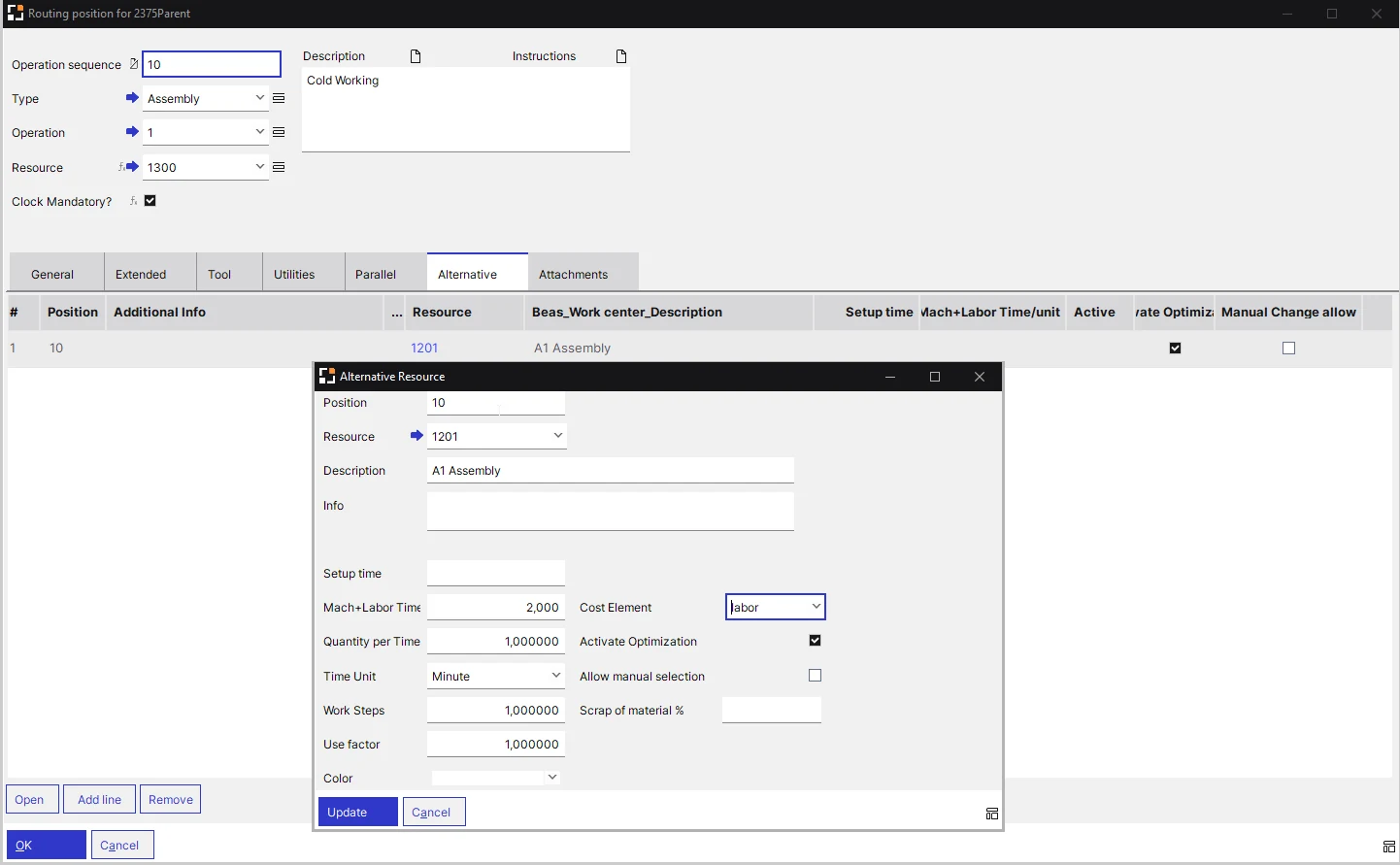
Alternative Resource
Routing position › Alternative tabDefined in the operations
Operational definition
Another resource that can perform an operation, with its own Setup time, Mach+Labor Time/unit and Use factor. Optimization lets Beas select the most adequate resource during the APS calculation; Allow manual selection controls whether users can switch to it.
Why it matters in Beas
Automatic optimization needs the APS licence and must be enabled on the resource, the resource group and the alternative. Alternative resources do not manage secondary times.
Everyday analogy
If the big burner is busy, the dal can cook on the small one. It takes a few minutes longer, but dinner is not delayed by half an hour.
See it in action:Alternative resources on the Production Planning page →
-
09
Graphic Utilization Display
Capacity Planning, APS › Graphic Utilization DisplayCapacity against workload, per resource
Operational definition
Shows planned times by day, week or month for each resource: a summary of all resource utilisation and a chart of capacity and workload in hours for the selected resource. Overloaded days show in red, and the Dispatches button lists the dispatches for the resource.
Why it matters in Beas
This is where the planner sees which resource is overloaded and when, the generic idea of a bottleneck. MRP2 gives a similar workload against capacity view per MRP scenario.
Everyday analogy
The single bathroom in a house when everyone leaves for work and school at 8. The chart shows the 8 o'clock queue before anyone is late.
See it in action:Graphic Utilization Display on the Production Planning page →
-
10
APS Gantt Chart
Production › Capacity Planning › APS › View › Gantt (Beas APS Gantt Viewer licence)Also called the graphic view
Operational definition
The graphical visualisation of the APS schedule on a Gantt chart, per work order or per resource, with resource workload. Work sequences can be moved freely in the graphical view; the After Movement setting decides whether a moved operation is marked, fixed or dispatched.
Why it matters in Beas
Moved operations are dispatched, but the following work sequences are not rescheduled; the planner runs Dispatch forward or another calculation type for that. The graphic view needs its own station-related licence.
Everyday analogy
A family wall calendar with one column per person: who has the car on which day, who is at tuition when. Move one booking and you can see who else it affects.
See it in action:APS Gantt chart on the Production Planning page →
One order, all ten terms
Illustrative scenario · not a client case study
A customer orders 2,000 brackets for the 20th. Beas creates a work order whose operations come from the item's routing: turning, then milling, then deburring. Each routing position names a resource and carries a Setup time and Mach+Labor Time/unit, so the milling operation needs 1 hour of setup plus 2,000 × 1.5 minutes: 51 hours in all.
Because the order is due on the 20th, the planner runs Backward Dispatch, so material is bought as late as possible. The milling VMC has Consider resource limits switched on, and its shift schedule has two day shifts with Sundays off, so 51 hours takes four working days, not two.
The Graphic Utilization Display shows the VMC in red that week. In the APS Gantt chart, the planner switches the operation to the older VMC, set up as an alternative resource with its own times, then runs Dispatch forward so the following operations are rescheduled. The order still finishes on the 19th.
A flat left-to-right diagram in the site colours: steel bar, then Turning (CNC-02), Milling (VMC-04, alternative VMC-01), Deburring, finished bracket. Setup time and time per unit under each step and the due date '20th' at the end. No stock-photo people.
2100 × 900 px · WebP · routing-diagram-bracket.webp
More on Production Planning
-
01
Feature Guide
How Beas Production Planning works, how it compares with standard SAP B1, and what it is worth to a plant.Read the Beas production planning feature guide -
10
10 Best Practices
Key settings for routings, calendars and resource limits, the risk if each is skipped, and the fix.Read the 10 best practices for Beas production planning -
05
5 Core Concepts
The big ideas behind finite capacity planning in Beas APS, and the shop-floor problem each one solves.Understand the 5 core concepts of capacity planning
See these terms on your own plant data
Share your machine list, shift pattern and a week of open orders. We load them into Beas and walk your team through APS using your own work orders and resources.