

Automatic Optimisation: Alternative Resources in APS
Let APS move work to the machine that finishes it sooner.
- Load
- Main full
- Faster alternative
- Replaced
At a glance
- Beas name
- Automatic optimization · Activate Optimization · Resource optimization
- Extends SAP B1
- Resources · Production
- Plans against
- Main and alternative resources, and resource groups
- Works with
- Production Planning (APS) · Routing
- Licence
- Beas APS (BEAS_APS, requires Beas Basic): automatic selection of resources with free capacity when working with alternatives or groups of resources; needed to change Automatic optimization and Resource optimization
From one machine per operation to the best of several
Automatic optimisation sits inside the APS calculation. It turns “this operation runs on CNC-L1” into “this operation runs on whichever listed lathe gives faster production”.
List the alternatives
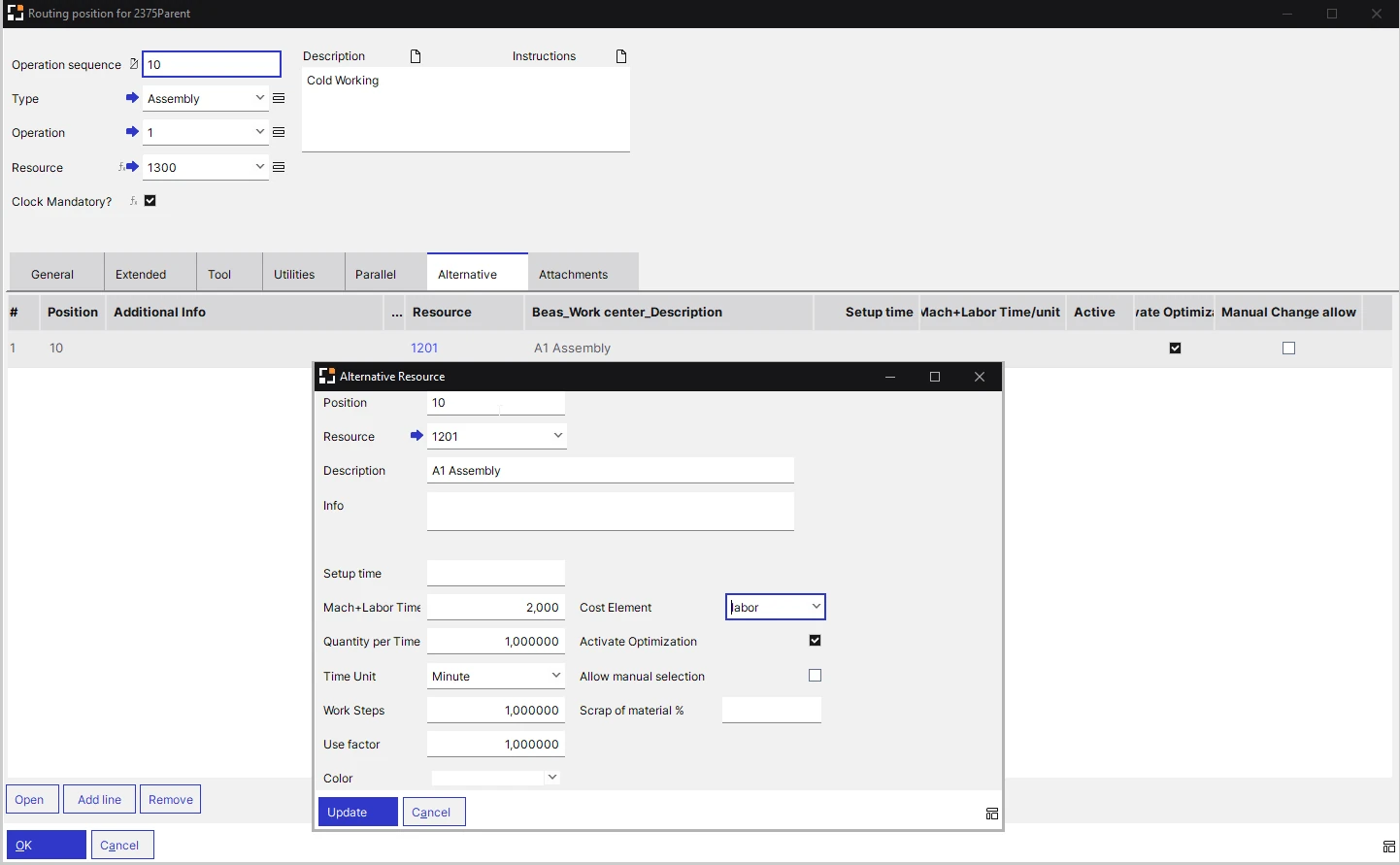
On the routing position's Alternative tab, add the other resources that can do the operation, each with its own times.
Group the machines
A resource group can hold machines that can be used alternatively; Optimization: Sequence selects which of them take part.
Switch optimisation on
Automatic optimization on the resource and the group, Activate Optimization on the alternative, and Resource optimization on the routing position for groups.
APS chooses
In the APS calculation, Beas checks whether production would be faster on the alternative and replaces the resource automatically.
The planner handles exceptions
With Allow manual selection and Allow changes, the planner switches to an alternative with one click in APS or on the work order.
What standard B1 assigns, and what Beas APS can swap
SAP Business One assigns resources to production orders and shows their capacity. Beas lists the other machines that can do each operation and lets APS replace the resource during the calculation.
| Planning need | SAP B1 native | Beas Automatic Optimisation |
|---|---|---|
| Which machine does the work | Resources (resource capacity) are assigned to production orders. Each resource has a type: Machine, Labor or Other. | Each routing position names a resource and can list alternative resources, each with its own times and cost element. Alternatives can be specific to an item. |
| Grouping machines | Every resource belongs to a resource group, which gives default settings and is used for analysis, reports and evaluations. | A resource group can use Automatic optimization for the resources selected in Optimization: Sequence; Directly schedulable plans each one separately. |
| Capacity | Internal, Ordered, Committed, Consumed and Available capacity per resource in the Resource Capacity window. | Planned Capacity in hrs. / day × Number of machines / persons. APS selects resources with free capacity when working with alternatives or groups (APS licence). |
| Spreading or moving the work | Resource Allocation spreads a production order's resource capacity: On Start Date, On End Date, Start Date Forwards or End Date Backwards, against Single Run Capacity. | With Activate Optimization, the resource is replaced automatically in the APS calculation; Resource optimization picks the group resource with the shortest lead time. |
| Resource cost | Up to 10 standard cost components per resource unit, with defaults from the resource group. | Each alternative carries its own Cost element and Scrap of material %, which apply when it is used. |
Eight settings behind the choice, and what each saves
Open any capability to see how it works in Beas, which licence it needs, and what it is worth to the business.
Operational Reality (Capabilities)
Alternative resources are defined on the Alternative tab of a routing position, and also in the operation catalogue and on a work order's production routing; changes there apply to that work order only. Each alternative has its own Setup time, Mach+Labor Time/unit, Quantity per Time, Time Unit, Work Steps, Use factor and Cost element, and alternatives can be specific to an item.
- Alternative tab of the routing position
- Item-specific alternatives with their own times
- Also in the operation catalogue and work order routing
Executive ROI Value
Which machines can do which operation is recorded once, in the master data, instead of in one planner's head.
- Planning survives leave and attrition
- A new machine joins the plan the day it is set up
Operational Reality (Capabilities)
With Activate Optimization on an alternative resource, Beas automatically selects the most adequate resource among the main and alternative resources in the APS calculation, and the resource is replaced automatically. The option checks whether faster production would be possible using the alternative.
- Activate Optimization per alternative
- Replaced automatically during the APS calculation
- Alternative resources have their own colour in the APS Gantt chart
Licence: Beas APS licence: it adds the automatic selection of resources with free capacity when working with alternatives or groups of resources
Executive ROI Value
Work goes to the machine that finishes it sooner without a planner re-keying operations, so idle capacity is used before overtime is booked.
- Shorter lead times on loaded machines
- Less overtime on the usual machine
Operational Reality (Capabilities)
On the resource's Scheduling tab, Automatic optimization decides whether the resource is considered in automatic optimization. For it to be considered, the option must also be enabled in the resource group and at the alternative resources. A resource made inactive on its General tab is still used by APS optimisation as long as it is stored in resource groups.
- Automatic optimization on the resource
- Automatic optimization on the resource group
- Activate Optimization on the alternative
Licence: Automatic optimization on the resource can only be changed with the Beas APS licence
Executive ROI Value
Whether a machine takes part is a setting anyone can check, not a planner's habit.
- Retired machines taken out cleanly
- Fewer surprises after adding a machine
Operational Reality (Capabilities)
A resource group can be a number of individual machines that can be used alternatively, or a collection of machines belonging to a production unit. In Edit resource group, Automatic optimization uses automatic optimization for the pre-selected resources, which the Optimization: Sequence window (Set up Optimization) selects. Directly schedulable lets each resource of the group be scheduled separately. Beas offers simple resource groups, resource domains and machine groups.
- Optimization: Sequence per group
- Directly schedulable for machine-level planning
- In APS, resources can be listed by resource optimization sorting
Executive ROI Value
Similar machines are planned as a pool, so the plan follows the capacity the plant really has.
- Work spread across a machine pool
- Special-purpose machines kept out of the pool
Operational Reality (Capabilities)
On a routing position's Extended tab, Resource optimization means that if the stored resource is part of a resource group, the resource with the shortest lead time is selected automatically from the group at scheduling. Parallel operations can also work with resource optimization.
- Set per routing position
- Shortest lead time within the group
- Also for parallel operations
Licence: Resource optimization can only be changed if the Beas APS licence is in place
Executive ROI Value
Each operation can be allowed, or not allowed, to move within its group, so engineering keeps control of where critical steps run.
- Flexible where it is safe
- Fixed where quality demands it
Operational Reality (Capabilities)
An alternative resource can be selected with one mouse-click in the APS graphical view and in the production structure display. The alternative needs Allow manual selection, and the work order position needs Allow changes. At the terminal, a personnel record with Resource selectable set to Alternative lets the employee choose between the default resource and its alternatives at work order login.
- APS graphical view and production structure display
- Allow manual selection and Allow changes
- Terminal login: choose an alternative
Licence: The APS graphical view is the APS Gantt chart, which needs the Beas APS Gantt Viewer licence
Executive ROI Value
The planner keeps the last word for what the plan cannot see, such as an operator on leave or a fixture at another machine.
- Decisions stay with the planner
- Operators can start on the machine that is free
Operational Reality (Capabilities)
When an alternative is used, its own times and Cost element apply, and its Scrap of material % replaces the scrap and recalculates scrap per material for all routing positions. In a work order, the related BoM position quantity is recalculated, but not order-related sub-assemblies. Alternative resources do not manage Secondary+Labor times, so those values are lost on a switch. Alternative resources are not supported in Precalculation.
- Own times and cost element
- Scrap of material % replaced
- Not supported in Precalculation
Executive ROI Value
Material and cost follow the machine that actually runs the job, so a switch does not leave a hidden shortage or a wrong cost.
- Material planned for the real scrap
- Costs written to the alternative's cost element
Operational Reality (Capabilities)
A resource can represent several machines or people: enter the number in Number of machines / persons, and planned capacity is multiplied by it. APS distributes the work between the machines, but detailed planning to a specific machine is not possible this way. In capacity planning only one machine from the group is dispatched, to minimise set-up times; with a backward APS calculation and a value above 1, no detailed capacity planning is done.
- Planned capacity × number of machines
- APS distributes the work
- No machine-level detail
Executive ROI Value
Identical machines are modelled in minutes, without maintaining alternatives on every operation.
- Quick to set up
- Right where machines are truly interchangeable
An Indian precision machining unit, with idle lathes and late orders
A machining unit supplying tractor and pump OEMs runs 24 CNC lathes and machining centres over two shifts on SAP Business One, with Beas APS already planning its work orders. Each routing still names one machine per operation.
The Operational Challenge
Every routing names the machine the setter prefers. When that machine is booked, APS plans the work later on the same machine, while two older lathes and a newer one stand idle on the second shift.
The planner spends the first hours of each day moving operations by hand to whichever machine looks free.
- Favourite machines booked two weeks ahead, others idle
- Sunday overtime on three machines
- Late dispatches despite spare capacity on the floor
- A morning of re-planning by hand, every day
The Financial Transformation
The plant lists alternative resources on the routing positions where another machine can do the job, each with its own times and scrap. Activate Optimization, Automatic optimization on the resources and Automatic optimization on the group LATHES are switched on, and the special-purpose lathe is left unticked in Optimization: Sequence.
In the next APS calculation, Beas replaces the busy machine wherever production is faster on an alternative. The planner keeps Allow manual selection for the few cases that need judgment.
- Idle machines take work in the plan, not by phone
- Planner time goes to exceptions
- Overtime booked only where the plan still needs it
- Dates based on every machine that can do the job
| Cost line | Before (per month) | After (per month) | Difference (per year) |
|---|---|---|---|
| Unplanned overtime on the usual machines | ₹ 2,40,000 | ₹ 90,000 | ₹ 18,00,000 |
| Express freight on late orders | ₹ 1,20,000 | ₹ 45,000 | ₹ 9,00,000 |
| OEM late-delivery debits | ₹ 1,50,000 | ₹ 60,000 | ₹ 10,80,000 |
| Planner time spent moving operations by hand | ₹ 60,000 | ₹ 20,000 | ₹ 4,80,000 |
| Total | ₹ 5,70,000 | ₹ 2,15,000 | ₹ 42,60,000 |
One setting, three answers
-
Promoter & CFO
Do we really need another machine?
When work moves to idle alternatives first, a capex request rests on the load after every capable machine is used, not on one busy favourite.
-
COO & Plant Head
Are idle machines taking the load?
The APS Gantt chart shows alternative resources in their own colour, so the plant head can see where work has moved to another machine.
-
Production Planner
Do I still move jobs by hand?
Activate Optimization handles the routine swaps in the APS calculation. Allow manual selection keeps the exceptions in the planner's hands.
Automatic Optimisation, explained in depth
-
10
10 Best Practices
The settings that decide whether APS can choose a machine for you, the risk if each is skipped, and the fix.
Read the 10 best practices for automatic optimisation in Beas -
Aa
Vocabulary
Ten terms as Beas names them, from Number of machines / persons to Allow manual selection, each with an everyday analogy.
Learn the 10 Beas terms behind automatic resource optimisation -
05
5 Core Concepts
The five ideas behind letting APS pick the machine, and the shop-floor problem each one solves.
Understand the 5 core concepts of alternative resources in APS
Related Beas features and B1 modules
- Beas 01Production Planning (APS)The APS calculation in which the resource is replaced.
- Beas 02MRP Wizard and MRP2Recommendations and resource load that feed the plan.
- Beas 04Resource Calendar and MaintenanceCapacity exceptions and maintenance plans.
- Beas 06RoutingWhere the alternative resources are defined.
- SAP B1 Module 10ResourcesThe machines and capacity Beas schedules against.
- SAP B1 Module 11ProductionBoMs and production orders that Beas extends.
See which idle machines could take your load
Share your machine list, the operations that more than one machine can do, and a week of open orders. We set up the alternative resources in Beas and show you where APS would move the work.
 Excellence Exemplified!The world's first Boyum Partner Center of Excellence.Spanning the entire Boyum Solutions portfolio — SAP Business One, B1UP, Beas Manufacturing, and Produmex WMS & Scan. Hosted in the cloud, available for evaluation and proof-of-concept work.See it to believe it — get convinced by working on it.Try Beas first in the PACE sandbox→